







Quick Ram Truck DIY: All-Weather Mats
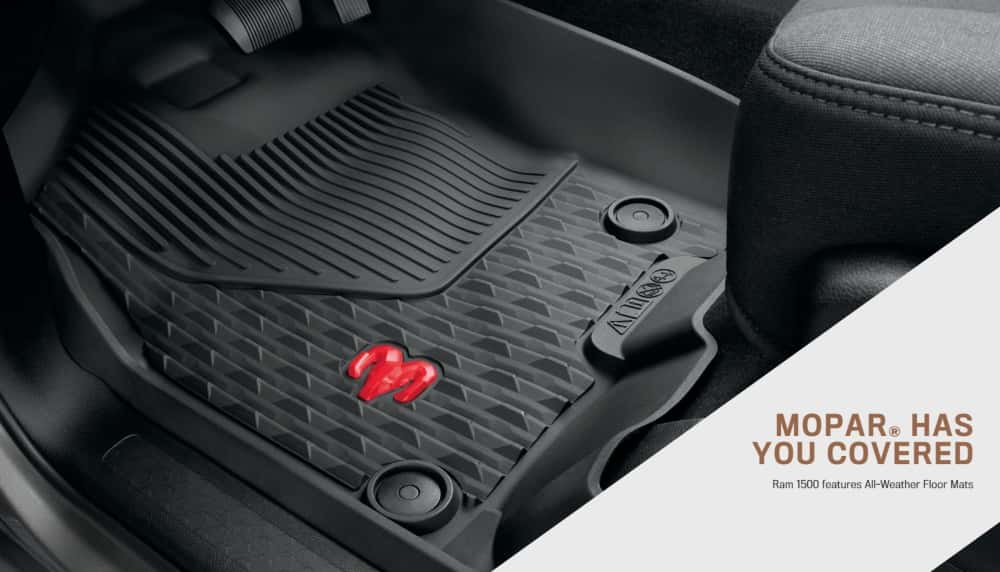
Photo Source/Copyright: Ram
Driving a Ram truck in Miami is an experience unlike any other, but the intense Florida sun, sudden downpours, and coastal sand can wreak havoc on your interior. The factory carpet is simply not built to withstand this constant assault. That’s where a simple, high-impact DIY project comes in: installing all-weather rubber floor mats. This guide will walk you through everything you need to know, transforming your truck into a fortress against the elements.
How Do All-Weather Mats Protect My Ram in Miami?
In a city defined by humidity and intense sun, your truck’s interior is constantly at risk.
Moisture can become trapped in carpeting, creating an environment ripe for mildew and unpleasant odors, while UV rays from the sun can cause fading and cracking on interior surfaces. By acting as a durable, waterproof barrier, all-weather mats trap and contain moisture, sand, and dirt, ensuring they never come into contact with your truck’s floor. This minor upgrade is a significant step in maintaining your vehicle’s comfort and preserving its resale value.
Your 7-Step DIY All-Weather Mat Checklist:
Step 1: The Critical First Step.
▼
Before anything else, remove all existing floor mats or carpet mats from your truck.
Stacking mats is extremely dangerous and can cause them to shift, potentially interfering with your accelerator or brake pedals and leading to unsafe driving conditions.
Always install new mats directly onto the clean vehicle floor.
Step 2: Get the Cabin Squeaky Clean.
▼
Once the old mats are out, thoroughly vacuum the carpet. Cleaning prevents dirt and debris from getting trapped underneath your new mats.
Step 3: Identify Your Mats.
▼
Most mats have “LHS” (Left-Hand Side, for the driver) and “RHS” (Right-Hand Side, for the passenger) on the underside. Lay them out to ensure you have the correct mat for each side.
Step 4: Secure the Driver’s Side.
▼
Place the driver’s side mat first. Line up the mat with the factory-supplied retention hooks or posts on your truck’s floor, then press down firmly to secure it in place.
If your truck doesn’t have hooks, install the anchors or grommets provided with your new mats.
Step 5: Confirm Pedal Clearance.
▼
With the driver’s side mat secured, test the accelerator, brake, and clutch (if applicable) to ensure they can move freely through their full range of motion without any interference.
Step 6: Install the Remaining Mats.
▼
Once the driver’s side is safe and secure, you can now install the passenger and rear mats.
Step 7: Check for Proper Fit.
▼
After installation, ensure the mats are fully seated and don’t interfere with any moving parts, like seat tracks.
What’s the Difference Between a New 2026 Ram and an Older Model?
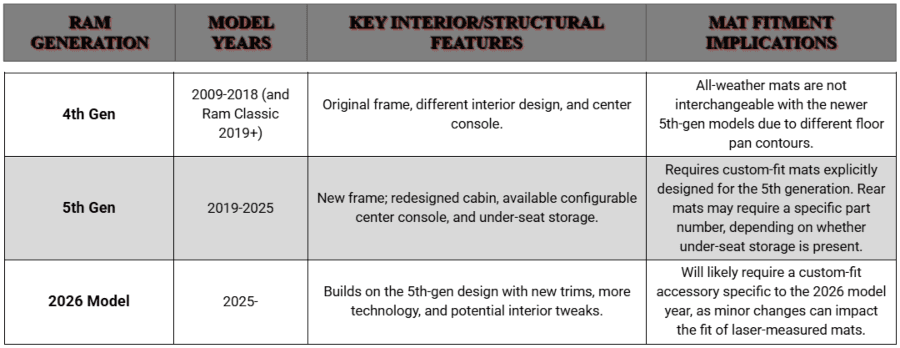
While the installation steps are similar, the fitment of mats changes with each generation of Ram trucks due to an entirely new frame and redesigned interior.
For example, a mat designed for a 4th-generation Ram Classic won’t fit a 5th-generation model from 2019 to 2025. The 2026 Ram lineup builds on the 5th-generation design with new technology and interior layouts, requiring a custom fit.
Some newer crew cab models even have a different rear floor depending on whether they have under-seat storage, which changes the required mat. These differences are why custom-fit accessories, like genuine Mopar all-weather mats, are crucial.
This proactive approach is about more than just floor mats. It’s about a comprehensive vehicle protection strategy for your Ram truck.
Ready for Impeccable Fitment? Contact Kendall Dodge Chrysler Jeep Ram Today!
For Miami Ram owners seeking a guaranteed fit and fast installation, reach out to our Parts Department.
We stock genuine Mopar liners and can advise on 2026 versus older Ram fitment. We also offer professional installation help that saves time and protects your investment.
Call the Parts Department or visit to view samples and receive a personalized fit recommendation.
More from Kendall Dodge Chrysler Jeep Ram
Could a Dodge Challenger Electric Be Next?
Photo Source/Copyright: Stellantis Short version: no. Not yet, and none announced. Type “Dodge Challenger electric” into a search bar and you’ll get a wall of results promising one, mostly written back when the rumor still had legs. A few even cite Dodge executives. What those execs actually said was that Stellantis owns the…
Jeep Grand Cherokee Altitude: Sleek Style Meets Value
Photo Source/Copyright: Edmunds Blacked-out trim has a distinct way of making people slow down and look twice on the street. That subtle visual gravitas forms most of the initial appeal behind the Jeep Grand Cherokee Altitude. Taking the robust architecture that underpins every Grand Cherokee, the Altitude darkens every exterior accent that would…
What Does The Ram App Really Do?
Photo Source/Copyright: Ram Trucks Cold morning, coffee in hand, and the truck in the driveway is already idling before you’ve found your boots. That’s the version of the Ram app most people hear about, but it’s actually the smallest part of the story. So, what does the Ram app actually do? Far more than…